Why Graphs Are the Right Architecture for Custom AI Workflows
- 08.12.2026
AI applications are getting more capable. But as they move from demos into real business workflows, capability is no longer the only question.
The harder questions are operational. What should AI decide on its own? What should remain deterministic? When should a person review or approve something? What happens when the system encounters an exception? And how can users understand what happened after the workflow is complete?
For enterprise AI, these questions matter as much as the model itself. This is why we increasingly believe graph-based workflows are one of the most useful architectures for building production AI systems.
The Model Should Not Have to Plan Everything
One of the key ideas in LangChain's Planning for Agents is that successful production agents often rely on domain-specific cognitive architectures. Instead of asking an LLM to determine an entire process dynamically, developers encode important parts of the workflow into the application itself.
That can include routing decisions, verification steps, deterministic calculations, business rules, and approval points. Some of the planning responsibility moves from the model into the architecture of the system.
This becomes especially important in enterprise applications. A general-purpose agent may be capable of choosing among hundreds of possible actions, but most businesses do not actually want hundreds of possibilities. They want AI to operate within a process that reflects how their organization works.
A retention team investigates attrition differently from how a bank evaluates credit risk. A workforce-management team responds to staffing problems differently from how a finance team investigates a forecast variance.
The intelligence may come from the same generation of foundation models. The workflow comes from the business.
A Graph Makes the Workflow Explicit
Graphs provide a natural way to represent that workflow.
Rather than hiding the application inside a large prompt or an open-ended reasoning loop, the process becomes visible: what happens first, where decisions occur, what information is required, when the system branches, and what should happen next.
A customer-monitoring workflow, for example, might move from detection to investigation, validation, recommendation, human review, action, and learning. Some stages can be deterministic. Others can allow an AI agent to reason about the evidence and determine what to investigate next. Important actions can pause until a person reviews them.
This avoids the artificial choice between deterministic software and autonomous AI. A well-designed graph can use both, applying AI where flexibility creates value while preserving control where reliability matters.
The graph becomes more than a technical diagram. It is an executable representation of how the business wants the system to operate.
Custom AI Should Reflect the Customer
This is particularly important for the kind of systems we build at QubitNexus.
We do not believe AI should sit next to the business as another generic application that users have to adapt to. We believe it should be embedded into the workflows where decisions already happen.
Every customer has different data, systems, KPIs, business rules, approval processes, risk tolerances, and operating practices. Much of the expertise behind those processes is also distributed across software, documentation, and the experience of the people running the operation.
Graph-based architectures give us a practical way to encode those differences into the solution.
Instead of forcing a customer into a predefined AI product, we can build the workflow around how that customer actually operates.
The client should not have to adapt its business to the AI product. The AI system should adapt to the client.
Human Judgment and Observability by Design
Graphs are also particularly well suited to human-in-the-loop applications.
Human involvement does not have to be added as an exception after the system has already been built. It can be designed directly into the workflow. An agent might investigate a problem and prepare a recommendation, but pause before an important decision. A business user can inspect the evidence, add missing context, correct the interpretation, approve the recommendation, or ask the system to investigate something else.
The workflow can then continue from that point.
This creates a practical division of labor. AI can continuously monitor information, identify changes, investigate possible explanations, and prepare recommendations. People remain responsible for the context and judgment that should remain human.
The graph also provides observability. In a multi-step system, users should be able to understand more than just the final answer. They should be able to see what path the workflow followed, what information it used, where it branched, what the model decided, and where a person intervened.
For business users, that makes AI less of a black box. For engineering and analytics teams, it makes the system easier to inspect, evaluate, improve, and govern.
The Workflow Can Learn
There is another important question: what happens to everything the system learns while it is running?
A user may correct an explanation. An investigation may uncover an event that explains an unusual pattern. A recommendation may be rejected because the business knows something that was not available in the underlying data.
Those interactions contain valuable organizational knowledge.
As we discussed in our recent work on harvesting knowledge from AI agents, useful AI systems should not treat every interaction as isolated. Approved findings, corrections, and business context can become reusable knowledge for future workflows.
This creates two complementary structures. The workflow graph describes how the system operates. The knowledge and memory layer preserves what the organization learns.
Together, they create something much more useful than a chatbot: a system that follows a defined business process while becoming better informed by the experience of the people using it.
An Example: Monitoring Customer Attrition
Our AI Monitoring Agent is a good example of this architecture in practice.
The solution continuously monitors customer signals for meaningful changes in attrition risk. When something unusual happens, the workflow can move from detection into investigation, analyze potential drivers across approved data sources, develop hypotheses, and prepare recommendations.
Different parts of the process have different responsibilities. Some steps follow deterministic rules. Some use AI reasoning. Some branch depending on what the system discovers. Important findings can be reviewed by a person, and approved context can become part of future monitoring.
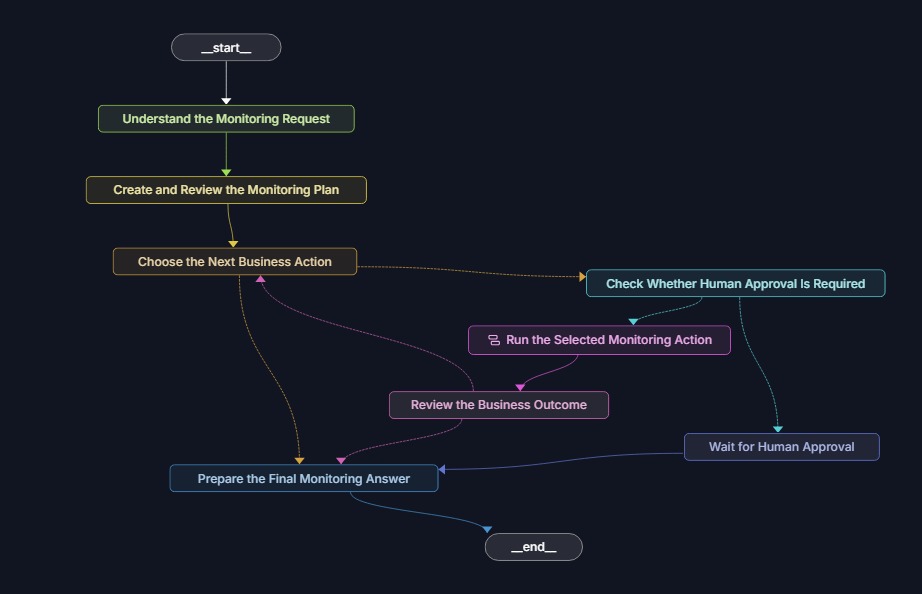
The graph therefore represents much more than the underlying software. It shows the operating model: how the system detects an issue, investigates it, introduces human judgment, turns the result into action, and preserves what was learned.
For our client, this architecture helped turn a traditionally reactive analysis process into a continuous intelligence workflow. The Monitoring Agent contributed to a 20% reduction in attrition, while also reducing repeated manual investigation and helping the team move more quickly from identifying a problem to determining what to do next.
AI Should Adapt to the Business
The future of enterprise AI is unlikely to be one autonomous agent doing everything. It is much more likely to consist of carefully designed systems where models, deterministic software, business rules, data, human expertise, and organizational knowledge work together.
Graph-based workflows give us a practical architecture for doing that. They make the process explicit, allow it to be customized to the business, introduce human judgment at the right moments, provide observability, and help preserve what the organization learns.
That is closely aligned with how we think about AI at QubitNexus.
We are not trying to give every customer the same AI product. We build AI capabilities inside the client's environment, around their data, their workflows, their decisions, and their expertise.
The graph is what helps turn that idea into a working system.